Version notes
Best Numberblocks Generator Versions Compared
I kept seeing people land on different Numberblocks Generator pages and then bounce around because they were not sure which one was the normal one. So I spent an evening opening the main NBB page, the 1 to Infinity version, the Scratch page, and the Websim build back to back. They all have their place, but they do not feel the same once you actually play them.
My quick take
If someone asks me where to start, I send them to the main NBB generator. I only switch to 1 to Infinity for bigger-number messing around, Scratch for source/project details, and Websim when I want a looser sandbox.
Guide review
Written with a stated source and review method
- Written and reviewed by
- Numberblocks Generator site team
- Last reviewed
- July 15, 2026
Reviewed against the linked player routes, source credits, and page-level guidance for the versions compared here. Community projects can change after this review.
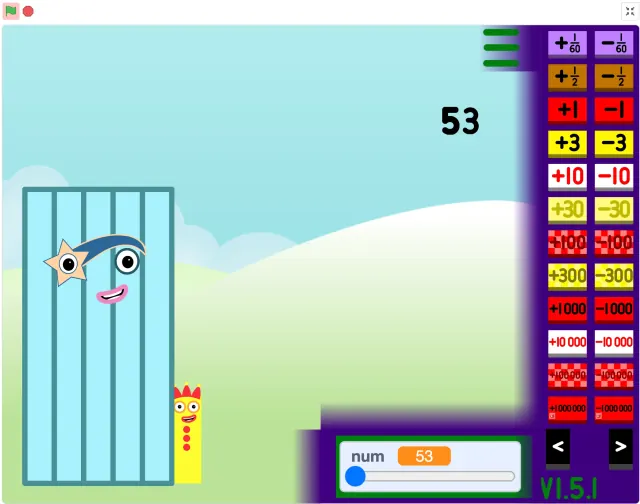
Main NBB generator: the one I open first
The main NBB generator feels like the least fussy option. You open it, wait for the player to settle, and you can usually start poking at numbers without explaining three different tabs first.
That matters more than it sounds. If I am showing the game to a younger player, I do not want the first minute to be about where the project came from or why the frame is tiny. I just want the stage up and the controls easy enough to find.
- Best first stop when you just want to play.
- Easy to hand to someone after a quick preview.
- Fullscreen helps if the stage feels squeezed.
1 to Infinity: better once you are warmed up
The 1 to Infinity version is the one I use when the normal page starts to feel too small in scope. It is more fun after you already know the basic rhythm of the generator.
I would not make it the first stop for everyone. Try a couple of easy values on the main page, then jump here when the player starts asking what happens with bigger numbers.
Scratch: good when you want the backstory
The Scratch version has a different job from the quick play buttons. It is where you go when you care about notes, remixing, creator context, or how the project is being shared.
For casual play I still prefer staying on the local page first. But if someone is older and curious about how it was built, the Scratch page is worth opening after the game session.
Websim: more like a toy box
Websim feels the most different. It is less like typing a number and more like wandering around a 3D play space to see what you can make happen.
That can be great, but it also wants more room. I would rather use it on a laptop or tablet than on a narrow phone screen, because otherwise half the fun becomes fighting the viewport.
My usual order
My order is pretty simple now: main NBB generator first, 1 to Infinity when the numbers get bigger, Scratch when I want project context, and Websim when I am in the mood to experiment.
Keeping those pages separate makes the site easier to use. You can pick the mood of the session instead of opening every version and hoping one of them is the right one.