Numberblocks Generator

Main version

NBB Numberblocks Generator

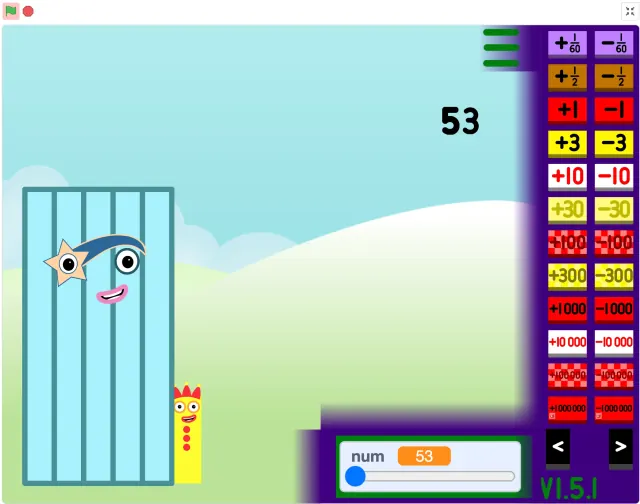
Use this page when you want the main NBB Numberblocks Generator version only. Start the Numberblocks Generator NBB player, create and test number block ideas, and open fullscreen when you want a larger stage.

Main Generator

Mobile Safari uses a lightweight site player with only the game frame loaded.

Credit: Original Numberblocks Generator created by @NBBetohBFB on YouTube. TurboWarp player: TurboWarp.

Rotate your device for a better play experience.

Open in new tab

Main version

What is the NBB Numberblocks Generator?

NBB Numberblocks Generator is the main fan-made version on this site. It is the best starting point when you want a quick browser session focused on the core Numberblocks Generator NBB experience instead of comparing alternate projects first.

The project was created by @NBBetohBFB on YouTube and runs on TurboWarp. This page keeps the experience focused on that main version: load the stage, use the in-game controls, try numbers, and stay inside one playable version.

Play flow

How NBB Numberblocks Generator gameplay works

Start the NBB Numberblocks Generator in-page player and give the TurboWarp frame a moment to load. Once the project is ready, use the controls inside the stage to build or adjust the number block idea you want to test.

A good first session is simple: try a smaller number, watch how the character or block arrangement changes, then move to another number. The goal is quick visual experimentation, not editing the project file or switching between remixes.

If the stage feels cramped, use fullscreen before you play for longer. A larger stage makes buttons easier to tap and gives the generated number block more room on laptops, tablets, and phones.

Ways to play

Best ways to use the NBB version

Choose NBB Numberblocks Generator for quick number block play, short classroom prompts, parent-guided number exploration, or a focused session where the user should start playing with minimal setup.

For younger players, start with familiar small values and talk through what changes on the stage. For older players, use it as a fast way to test number ideas before moving to bigger-number or remix-focused versions.

This page intentionally keeps the player locked to the NBB version. If the activity is specifically about huge values, use 1 to Infinity. If the activity is about Scratch remix context, use the Scratch version.

Controls

Controls and play tips

The NBB Numberblocks Generator controls that matter most are inside the in-page project itself. Use the page buttons only for loading, fullscreen, refreshing the frame, or opening the site player in a new tab.

On mobile, rotate to landscape if the project controls feel too tight. If the browser blocks the player frame, open the player directly in a new tab and continue from there.

Avoid switching pages in the middle of a session. Each inner page is designed for its own version, so the NBB page is best when you want the main generator without extra comparison choices.

Loading help

If NBB Numberblocks Generator does not load

The NBB Numberblocks Generator player depends on TurboWarp and browser frame permissions. Refresh once, then open the site player in a new tab if the frame stays blank.

Mobile browsers can be stricter with Scratch-style in-page projects. Landscape mode, fullscreen, or the new-tab player usually gives the main generator more usable space.

Quick tips

Use this page safely

  • Start here for the simplest NBB Numberblocks Generator experience.
  • Wait for the TurboWarp frame to finish loading before tapping controls quickly.
  • Try a smaller number first, then move to more complex number ideas.
  • Use fullscreen when the player stage feels cramped.
  • Rotate phones and tablets to landscape for more room.
  • Open the player in a new tab if a browser blocks the frame.
  • Use alternate version pages only when you need their specific play style.

What to do next

Play it here

Start the game above. If it feels tight or does not load, open the site player in a new tab and use fullscreen there.

FAQ

Numberblocks Generator Questions

Is NBB Numberblocks Generator the main version?+

Yes. This page is focused on the main fan-made Numberblocks Generator version used for quick browser play on this site.

Who created NBB Numberblocks Generator?+

The NBB Numberblocks Generator version was created by @NBBetohBFB on YouTube and runs on TurboWarp.

How do I start playing?+

Use the in-page player near the top of the page. Wait for the project to load, then use the controls inside the stage to try number block ideas.

What can I do in the generator?+

You can use the project controls to experiment with number block characters or arrangements, test different numbers, and see how the stage changes as you play.

Does NBB Numberblocks Generator work on mobile?+

Yes, but the player stage can feel small on phones. Landscape mode, fullscreen, or opening the player in a new tab usually gives the best mobile experience.

Why should I use fullscreen?+

Fullscreen gives the Scratch-style stage more room and can make controls easier to use on laptops, tablets, and mobile devices.

How is this different from 1 to Infinity?+

The NBB page is for the main quick-play version. 1 to Infinity is better when the activity is specifically about bigger numbers.

Can I play Numberblocks Generator NBB for free?+

Yes. Numberblocks Generator NBB is the main fan-made generator on this site and can be played for free in a web browser.

What should I do if it loads slowly or appears blank?+

Refresh once, disable strict blockers for the page if appropriate, or open the site player in a new tab so it can run in a dedicated player page.