Numberblocks Generator

Numberblocks Generator Websim

Numberblocks Generator Websim

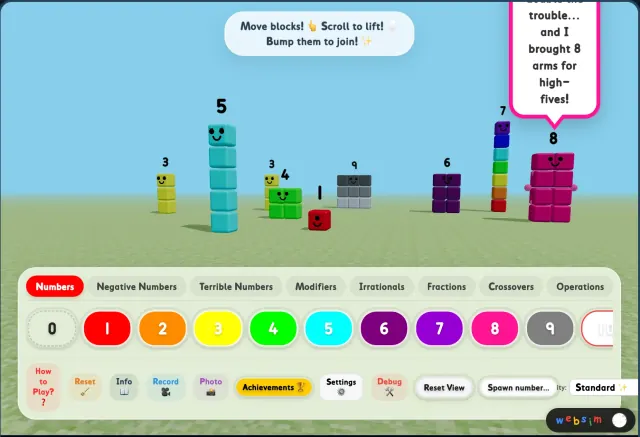
Numberblocks Generator Websim is the 3D sandbox path on this site: TV10TheCool's Numberblocks Playground on Websim, where you drag, lift, and bump Numberblocks on a grassy stage. Use this page to start Numberblocks Generator Websim in your browser, spawn heroes and villains, try math operations, hunt 16 achievements, and explore tabs from 0–100 through the Hundreds categories.

Websim

Mobile Safari uses a lightweight site player with only the game frame loaded.

Play in new tab

Rotate your device for a better play experience.

Open in new tab

Websim version

What is Numberblocks Generator Websim?

Numberblocks Generator Websim is the browser playground version for users who want a 3D sandbox instead of TurboWarp-style 2D play. It features TV10TheCool's expanded fork of Numberblocks Playground on Websim, with hundreds categories, villains, achievements, and recording tools.

Choose Numberblocks Generator Websim when the goal is open-ended sandbox play—dragging blocks, merging values, spawning Terrible Numbers, and hunting secrets—rather than typing a number into a classic generator stage.

This page keeps the player focused on Numberblocks Generator Websim only. For quick 2D generator sessions, use the main NBB version or 1 to Infinity from the related pages below.

Basic controls

How to move, lift, join, and reset blocks

Start the player above, then use these in-game controls on the grassy stage.

Move: Drag any block with your finger or mouse to reposition it on the playground.

Lift: While dragging, use the scroll wheel or pinch gesture to change a block's height above the ground.

Join: Bump two positive numbers together and they add up—watch the blocks merge into a new total.

Talk: Place two blocks near each other and wait. Numberblocks love to chat when they are close enough.

Reset: Tap the broom icon in the bottom bar to clear the playground and start fresh.

Use the Numbers tab at the bottom to spawn 0–100 in Numberblocks Generator Websim, then switch tabs for negatives, fractions, operations, and more.

Advanced math

Operations, sequences, and modifiers

Operations: Open the Operations tab to spawn math symbols (−, +, ×, ÷) as blocks you can place on the stage.

Sequences: Tap a number, then an operator, then another number to perform a calculation in order.

Modifiers: The Modifiers tab affects every block on the playground at once—useful for classroom demos or wild experiments.

Compound Numbers and Multi-Spawn tabs offer extra ways to build larger values or spawn groups quickly.

Irrationals and Fractions tabs include special values such as π and common fractional Numberblocks.

Number profiles

Heroes, clubs, and special guests

1–10: The original squad from the show—each number has its own personality and look.

Square Club: 4, 9, 16, 25, 36, 49, 64, 81, and 100 are proud squares. (4 is still scared of circles.)

Rectangle Club: 12, 18, 24, 28, 32, 42, 48, 54, 56, 63, 64, and 72 love rearranging themselves into different rectangle shapes.

Step Squads: 3, 6, 10, and 15 form perfect staircases when you line them up.

Special guests include 11 the Soccer Star, 14 the Skateboarder, 20 the Tap Dancer, and 26 the Secret Agent.

Browse the Hundreds through Nine Hundreds tabs to spawn 100–999, plus Alternatives and Maps for extra worlds in Numberblocks Generator Websim.

The villains

Terrible Numbers and how they behave

Terrible Twos: Small orange troublemakers you can spawn from the Terrible Numbers tab.

Terrible Four: A 2×2 green menace that plays by villain rules instead of hero merge logic.

Octonaughty: A giant 8-block villain and Octoblock's arch-nemesis.

Tip: Villains cannot merge with heroes—they only merge with each other. Keep hero and villain play separate for the intended behavior.

Mysteries & secrets

Hidden behaviors worth trying

Nine's Sneeze: Nine is shy and sometimes sneezes his center block out, splitting into an 8 and a 1.

Infinity: Spawn the heaviest block and drop it from high up to trigger a massive earthquake effect.

Negative Land: Spawn more than ten negative blocks and the world inverts—positives are vaporized in this mode.

Crossovers: Reach a total playground value of 85 to unlock Windows. Mario is always ready for a "Let's-a go!"

Negative Numbers, Crossovers, and Maps tabs are where most of these secrets begin—experiment after you learn the basic controls.

Achievements

16 hidden achievements to discover

The playground hides 16 achievements. Open the trophy icon in the bottom bar to track what you have unlocked.

Hints from the in-game guide: try irrational numbers, unlucky number combinations, and different graphics quality modes.

Use Settings to switch between Optimized, Standard, and High Graphics—some secrets respond to visual or performance modes.

Record and Photo buttons let you capture clips or screenshots when something surprising happens on the stage.

Spawn categories

Hundreds tabs and custom rules

Two Hundreds (200–299): Numbers follow the same body rules as Hundreds—200's body plus tens and ones composition.

Numbers 201–299 spawn near the ground (~1 unit above the surface). 200 itself spawns higher, around 20 units up.

Three Hundreds through Nine Hundreds extend the same pattern for 300–999.

Root blocks come from Operations. Root block numberlings use √ and appear in yellow.

Original project credit goes to @Simulation on Websim. This Numberblocks Generator Websim page features TV10TheCool's expanded Numberblocks Playground fork.

Before you play

Start on this page or open fullscreen

Use the in-page player above to load Numberblocks Generator Websim, dismiss the welcome tour if you prefer, then pick a tab and spawn your first number.

Open the fullscreen player or Source link when the frame feels tight, when number buttons fail to appear, or when you want the full browser window.

If the bottom number bar stays empty, check that api.websim.com is not blocked by an ad blocker or network filter—the spawn buttons depend on the Websim platform script.

For quick Scratch-style play without a 3D sandbox, switch to the main generator or 1 to Infinity from the related pages below.

Loading help

If Numberblocks Generator Websim does not load

Numberblocks Generator Websim depends on the Websim platform and browser frame permissions. Refresh once, then open the site player in a new tab if the frame stays blank.

Mobile browsers can be stricter with in-page embeds. Landscape mode, fullscreen, or the new-tab player usually gives the sandbox more usable space.

Allow api.websim.com when spawn buttons are missing. That script powers the number bar in the Websim player.

Quick tips

Use this page safely

  • Start Numberblocks Generator Websim in the player above before hunting achievements or villains.
  • Drag to move blocks; scroll or pinch while dragging to change height.
  • Bump two positive numbers together to add them.
  • Use Operations for + − × ÷, then build number-operator-number sequences.
  • Try the Terrible Numbers tab for villains—they do not merge with heroes.
  • Hunt all 16 achievements with irrationals, unlucky combos, and quality modes.
  • Open fullscreen if spawn buttons or controls feel cramped.
  • Allow api.websim.com if the Numbers tab shows tabs but no digit buttons.

What to do next

Play it here

Start the game above. If it feels tight or does not load, open the site player in a new tab and use fullscreen there.

FAQ

Numberblocks Generator Questions

What is Numberblocks Generator Websim?+

Numberblocks Generator Websim is this site's 3D browser playground path—TV10TheCool's Numberblocks Playground on Websim. Drag blocks, bump numbers to add them, spawn villains, try math operations, and unlock 16 achievements without leaving the page.

How do I spawn numbers in Numberblocks Generator Websim?+

Load Numberblocks Generator Websim in the player above, select a category tab at the bottom—start with Numbers for 0–100—then tap a numbered button to spawn that block on the stage. Other tabs cover negatives, fractions, hundreds, villains, and more.

How do I add two Numberblocks together?+

Drag two positive numbers into each other in Numberblocks Generator Websim. When they bump, they merge and add up. Villains from the Terrible Numbers tab follow different rules and only merge with other villains.

What are the Terrible Numbers?+

Terrible Twos (orange), Terrible Four (green 2×2), and Octonaughty (magenta 8-block villain). Spawn them from the Terrible Numbers tab in Numberblocks Generator Websim. They cannot merge with hero Numberblocks.

How do I unlock Crossovers and Mario?+

Reach a total playground value of 85 to unlock Windows in the Crossovers tab. Mario and other crossover characters appear there once unlocked.

Why is the Numbers tab empty with no spawn buttons?+

Numberblocks Generator Websim loads spawn buttons from the Websim platform script at api.websim.com. If an ad blocker or network filter blocks that script, tabs and settings may appear but the number buttons will not. Allow api.websim.com or open the game in a new tab.

Can I play Numberblocks Generator Websim here without leaving the site?+

Yes. This page embeds Numberblocks Generator Websim through TV10TheCool's Numberblocks Playground on Websim. Use fullscreen or the dedicated player page when you want more room.

Who created the original Numberblocks Playground?+

The original project was created by @Simulation on Websim. The playable fork on this Numberblocks Generator Websim page is TV10TheCool's expanded version with hundreds categories, achievements, recording, and additional Numberblocks.

What should I use instead of Numberblocks Generator Websim?+

Use the main NBB generator or 1 to Infinity for faster TurboWarp-based play. Use the Scratch version if you want remix and project-page context instead of a 3D Websim sandbox.