3D Numberblocks Generator
Create custom 3D Numberblocks from any number. Build, customize, combine, split, and download your own Numberblock character online.
Runs in your browser. Saved characters stay on this device unless you download an image.
Made with the original 3D builder
Build a whole number-block scene
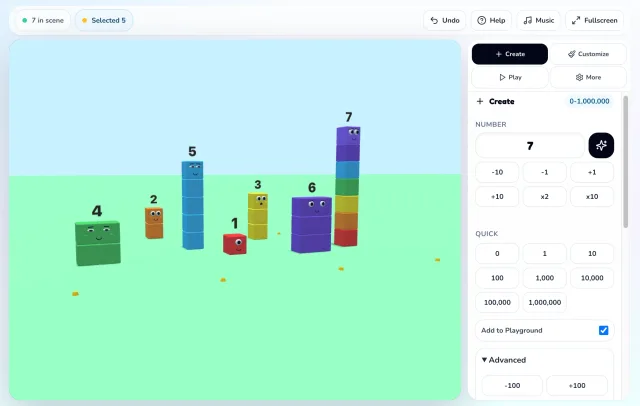
Choose a number, give it a shape and personality, then create a scene you can keep. The 3D Numberblocks Generator is built and maintained by our site team, with its builder controls, local saves, number actions, and PNG export all running in the browser.
- Built on this site
- Runs in your browser
- No account required
- Saved on your device
- Export a PNG
Built and tested by the Numberblocks Generator site team · Updated July 15, 2026
Product notes
Built, tested, and updated on this site
The 3D builder is maintained by the Numberblocks Generator site team. Its controls, local saves, and image export are site features—not a third-party embedded project.
- Built by
- Numberblocks Generator site team
- Last product review
- July 15, 2026
- Latest browser check
- Chromium at 1440 × 1000 and 390 × 844
- Stored locally
- Settings and saved characters stay in the active browser
Known limits
- The builder needs WebGL. A browser or device that blocks WebGL shows the on-page fallback instead of the 3D scene.
- Large numbers are supported up to 1,000,000, but complex scenes use more graphics memory and may be slower on lower-powered devices.
- Saved characters are not synced between devices or browser profiles.
Recent product updates
July 15
Made the preview and direct builder launch easier to use.
July 12
Improved mobile start controls and the on-screen builder layout.
July 4
Extended whole-number input up to 1,000,000.
Create
Popular 3D Numberblocks to Try
Start with these popular numbers or create your own custom 3D Numberblock.
Fun 3D shape ideas
- Make Numberblock 12 as a rectangle
- Make Numberblock 16 as a square
- Make Numberblock 25 as a 5 x 5 block
- Make Numberblock 100 as a tall tower
- Make Numberblock 1000 as a cube-style model
How It Works
How the 3D Numberblocks Generator works
The game turns one typed number into a playable 3D Numberblocks character. Start with the block count, then use the builder controls to adjust layout, style, scene, and math actions without leaving the page.
What you can make
This custom Numberblocks maker is for building your own Numberblock character instead of only playing a fixed generator. Each character starts from a number, so a small value becomes a simple stack while a large value becomes a bigger 3D block model.
Use it when you want a specific number, a classroom-style visual, a transparent Numberblock image for a worksheet, or a playful character design with your own colors and face.
Main game functions
The Create panel controls the number and layout. The Customize panel changes color, material, face, expression, headwear, add-ons, and background. The Play tools let you jump, dance, celebrate, fall apart, rebuild, split, merge, and combine characters.
Photo Mode is built for quick sharing. You can frame the 3D scene, choose a transparent background when needed, and download a PNG without uploading the character to an account.
- Number input range: 0 to 1,000,000.
- Layouts include compact, tall, wide, rectangle, steps, pyramid, solid, and random.
- Saved Characters stay in local browser storage on the same device.
When to use this page
Use this page when you want to make a 3D Numberblock instead of only playing a fixed generator. Enter a number, choose a shape, change the colors and face, then save or download the result.
Customize
3D Numberblocks Generator Features
Build exact 3D Numberblocks
Enter any whole number from 0 to 1,000,000 and the generator builds a character with that exact number of visible blocks.
Customize shape, style, and scene
Switch between compact, tall, wide, rectangle, steps, pyramid, solid, and random layouts, then tune colors, material, face, expression, accessories, and background.
Play, save, and export
Add multiple characters to the 3D playground, combine numbers, split characters, save recent builds locally, and export a clean PNG from Photo Mode.
Play
Which Numberblocks Generator Should You Use?
Different Numberblocks tools are useful for different types of play.
| Tool | Best for | Open |
|---|---|---|
| 3D Numberblocks Generator | Creating a custom 3D Numberblock with layouts, colors, faces, and PNG export. | Current page |
| Numberblocks Playground Websim | Playing in a sandbox-style 3D playground with dragging, merging, and interactive scenes. | Open Websim Playground |
| Classic Numberblocks Generator | Quickly opening the original-style generator experience. | Open Classic Numberblocks Generator |
3D Numberblocks Generator FAQ
What is the 3D Numberblocks Generator?
It is a browser-based builder for creating custom 3D Numberblocks-style characters from exact block counts. You choose the number, layout, colors, face, scene, and actions.
Does the generator use the exact number of blocks I enter?
Yes. Enter a whole number from 0 to 1,000,000 and the game builds a 3D character with that exact block count.
What can I customize in the 3D Numberblocks Generator?
You can change the layout, color palette, material, face style, expression, headwear, add-ons, background scene, and camera angle.
Can I combine or split Numberblocks characters?
Yes. You can place multiple characters in the playground, combine selected characters into a new number, or split a character into smaller parts.
Can I make Numberblock 100 in 3D?
Yes. Enter 100 in the generator, choose a layout such as tower, rectangle, or compact, then customize the colors and face.
Can I create a custom Numberblock with my own colors?
Yes. The 3D Numberblocks Generator lets you choose colors, expressions, layouts, and other visual options to create your own character.
Can I download my 3D Numberblock as an image?
Yes. You can save or download your custom 3D Numberblock as a PNG image, including transparent background captures.
What is the difference between this 3D generator and the classic Numberblocks Generator?
The 3D generator focuses on building and customizing a 3D Numberblock character, while the classic generator is better for quickly opening the original-style generator experience.
Does the 3D Numberblocks Generator save my creations?
Saved Characters are stored locally in your browser, without an account or upload.
Does the 3D Numberblocks Generator work on phones and tablets?
Yes. The game uses a touch-friendly canvas, large controls, and a mobile layout that keeps the page scrollable.